

The traditional static website is no longer sufficient to sustain a modern business. For years, companies treated their online presence as a digital brochure—a static layout with standard copy and a basic contact form. However, passive pages do not capture attention or scale growth.
To capture high-value leads and convert casual visitors into clients, you must understand how to build an interactive website that functions as a highly optimized, dynamic business asset.
What Is an Interactive Website?
An interactive website is a high-performance digital platform that actively engages users through responsive, real-time tools—such as custom project estimators, dynamic search filtering, personalized client portals, and multi-step intake funnels. Unlike static pages, interactive web architecture adapts to user behavior, delivering immediate, personalized value and accelerating the buyer’s journey.
True web interactivity is not about distracting background animations, heavy videos, or flashy visual gimmicks that slow down page speeds. Instead, meaningful interactivity is rooted in utility.
When built with precise engineering, interactive tools do the heavy lifting of your sales pipeline. They qualify prospects, automate client intake, and drive inbound revenue before a member of your team ever jumps on a call.
However, executing this without destroying your site’s search visibility or speed requires a strategic balance of planning and lightweight coding.
The Strategic Blueprint: Planning Beyond the Aesthetics

Many businesses make the mistake of adding interactive elements to their website without a plan. They add a custom calculator or a multi-step form simply because a competitor has one, without analyzing how their target audience actually behaves.
Without rigorous planning, interactive elements become expensive, confusing speed bumps that hurt your conversion rate.
Before a single line of code is written, a high-performance interactive website must be mapped using behavioral UX (user experience) and precise user journey mapping.
Behavioral UX and User Journey Mapping
Behavioral UX is the study of how users interact with digital interfaces based on cognitive psychology. When a visitor lands on your site, they have a specific goal and a finite amount of patience.
Your site’s interactive elements must align with their mental model.
[Cold Prospect Lands] ➔ [Clear Value Indicator] ➔ [Low-Friction Micro-Interaction] ➔ [Qualified Lead Capture]
To guide a user seamlessly from a cold visit to a booked call or sale, we map every phase of their journey:
- The Entry Point: Where does the user land, and what is their immediate intent?
- The Friction Reduction Phase: How can we get them to interact with a tool (like an estimator) with the least effort? This means using progress bars, auto-populating fields, and offering clear visual feedback.
- The Micro-Reward: What instant value does the tool provide? If they use a calculator, they should get immediate, clean data, not just a generic “Thank you, we will email you” message.
- The Transition Point: How do we convert that interaction into a qualified business lead?
Wireframing the High-Value Interactive Elements
Wireframing interactive tools requires deep attention to layout details. It is not just about where elements sit on a screen; it is about how those elements respond to input.
- We look at state changes (how a button changes color to show it can be clicked).
- We plan logical conditions (if a user selects option A, they should not see options meant for B).
- We design for mobile-first interactions (ensuring input fields and buttons are easy to tap on smaller screens).
Why Strategy Must Precede Execution: The Discovery Phase
Skipping this architectural planning leads to bloated software that users abandon. Aligning complex technical architecture with actual business goals requires an engineering team that specializes in web strategy.
This is why we start every project with the Interactive Builds Discovery & Strategy Phase. Instead of guessing what tools your business needs, we run a data-backed analysis of your customer base, design the interactive user flows in low-fidelity wireframes, and establish a clear technical roadmap. We ensure every button, form, and tool is built to solve a specific problem and generate measurable revenue.
The Structural Stack: Building “From Scratch” vs. True Custom WordPress Engineering
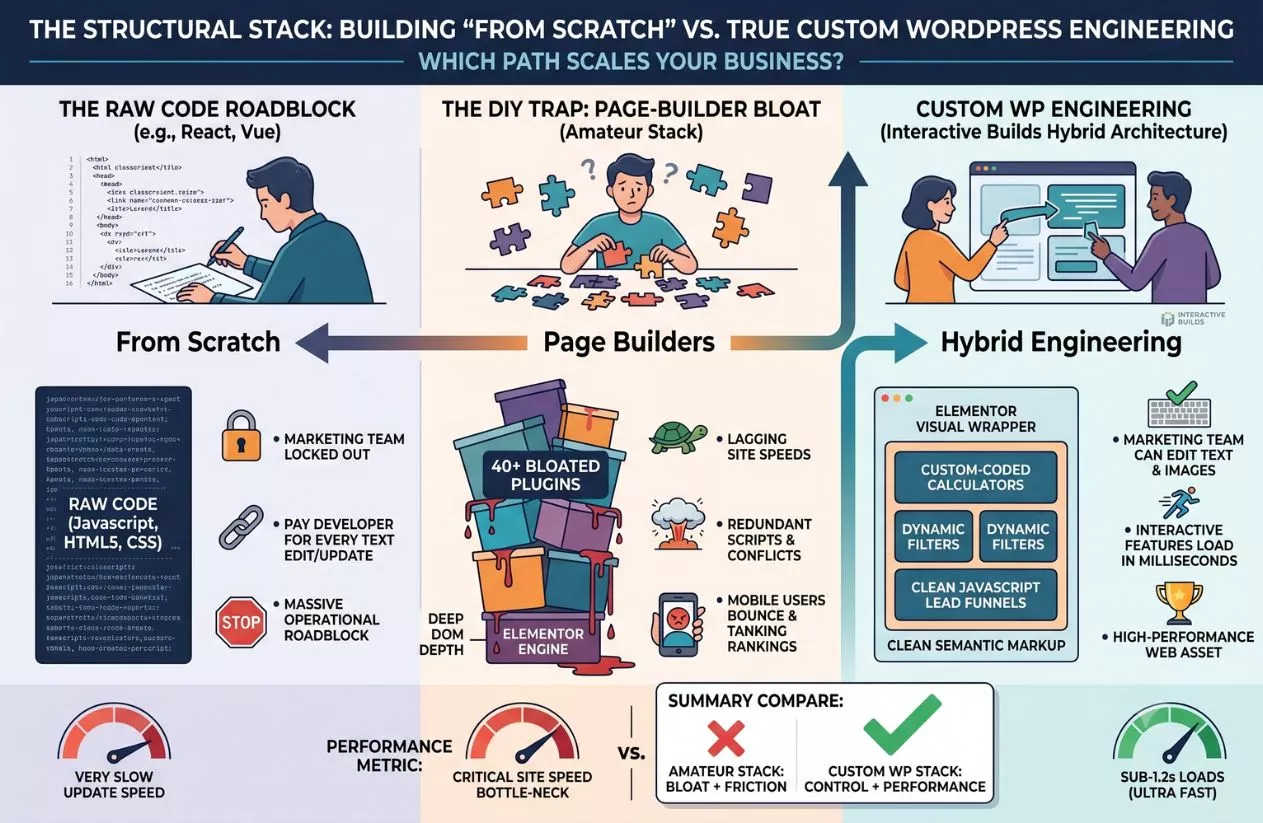
When deciding how to build an interactive website from scratch, many business owners assume they must choose between two extremes: writing thousands of lines of raw, custom code from the ground up, or installing a cheap, bloated template that slows to a crawl.
Understanding how these two paths operate in the real world is key to protecting your business from a costly technical mistake.
The Problem with Raw Code “From Scratch”
Building an interactive site using pure raw code (such as React, Vue, or vanilla Javascript APIs) is excellent for specialized, enterprise-level web applications. However, for a growing business, it creates a massive operational roadblock.
Every time you need to change a line of text, update a service price, or publish a blog post, you are locked out. You cannot make simple updates yourself; instead, you must pay a developer to change the code. Your marketing team becomes completely dependent on a programmer just to edit your copy.
The DIY Trap: Page-Builder Bloat
To avoid this lockout, many businesses turn to popular WordPress page builders. While tools like Elementor provide a visual canvas, untrained DIY creators and cheap freelancers often build these sites incorrectly.
To achieve interactivity, they stack dozens of third-party plugins—one for a slider, one for a multi-step form, another for a pop-up, and another for a dynamic filter. This creates extreme “code bloat.”
Behind the scenes, your server is forced to run redundant scripts, conflicting styles, and massive nested HTML tags (known as DOM depth). The site slows down, mobile users bounce, and your search engine rankings tank.
Amateur Stack: [Elementor Engine] + [40+ Bloated Plugins] ➔ Deep DOM Depth ➔ Lagging Site Speeds
Custom WP Stack: [Elementor Wrapper] + [Custom-Coded Engines] ➔ Clean Semantic Markup ➔ Sub-1.2s Loads
The Interactive Builds Hybrid Architecture
We believe businesses deserve a high-performance web asset that they actually control.
At Interactive Builds, we deploy a hybrid engineering model. We use WordPress and Elementor strictly as a streamlined, user-friendly visual wrapper. This guarantees your marketing team can edit text, swap images, and publish pages without writing code.
However, we do not use third-party plugins to run your interactive tools. Instead, we custom-engineer your calculators, dynamic filters, and lead funnels directly into the theme using clean, lightweight Javascript and server-side processing.
This approach keeps your database lean, removes unnecessary style sheets, and ensures your interactive features load in milliseconds—giving you an enterprise-grade web application wrapped in an interface that is as simple to update as a text document.
The Performance Bottleneck: Balancing Interactivity and Sub-1.2s Speeds
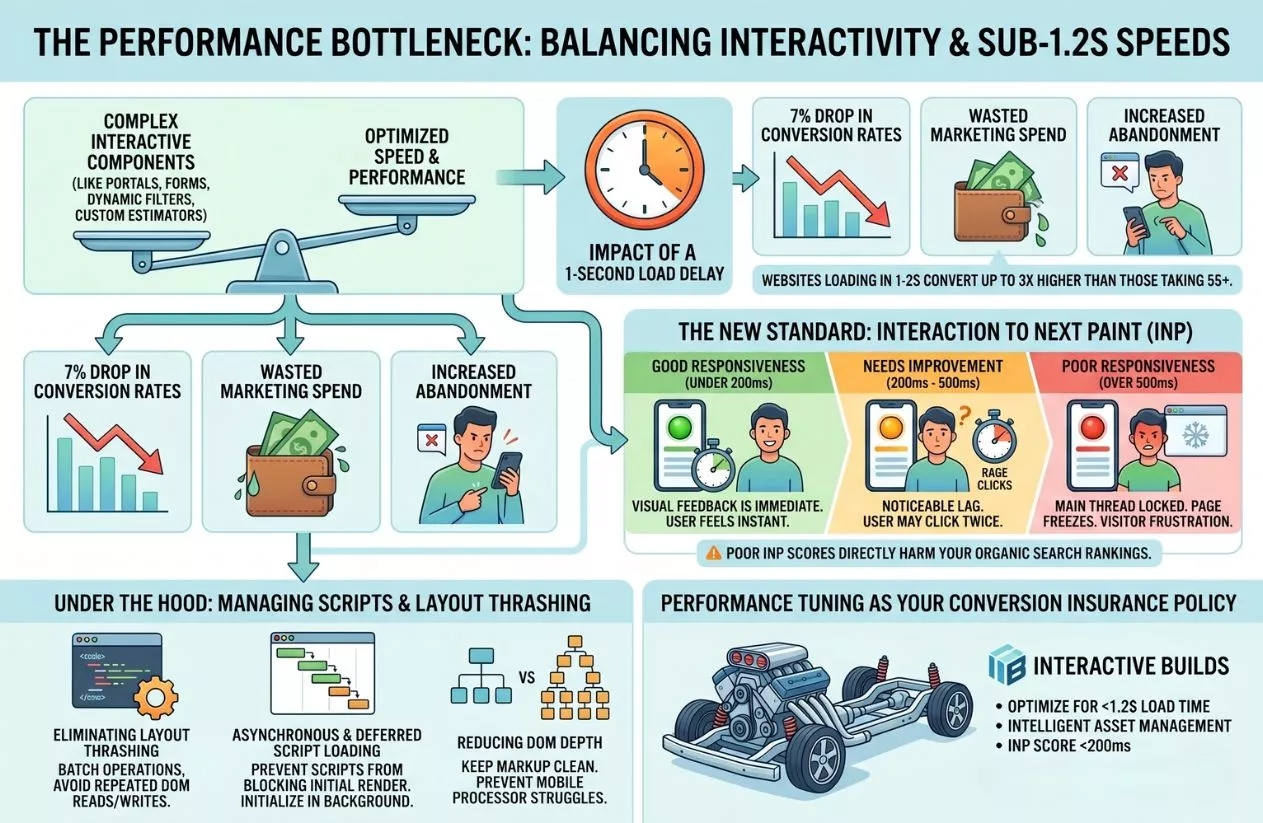
Adding highly functional components to your website introduces a critical engineering challenge: page weight. If your custom estimators, portals, or search filters are not properly optimized, they will slow your site down. In web development, speed is directly linked to profitability.
[1-Second Load Delay] ➔ [7% Drop in Conversion Rates] ➔ [Wasted Marketing Spend]
A one-second delay in page load time results in a 7% drop in conversion rates. Websites that load in one to two seconds convert up to three times higher than those taking five seconds or more. If a user has to wait for a complex form to render or load on their phone, they will simply close the tab.
The New Standard of Interactivity: Interaction to Next Paint (INP)
To measure how responsive your interactive elements are, Google uses a Core Web Vital metric called Interaction to Next Paint (INP).
INP measures the time between a user taking an action on your page (such as clicking a calculate button, opening a portal dropdown, or typing into a dynamic filter) and the moment the browser actually paints the next visual frame on the screen.
- Good Responsiveness (Under 200ms): The page feels instant. The user clicks, and the visual feedback is immediate.
- Needs Improvement (200ms – 500ms): There is a noticeable lag. The user may click twice, thinking the site is broken, resulting in “rage clicks.”
- Poor Responsiveness (Over 500ms): The browser’s main thread is locked up. The page freezes, causing immediate visitor frustration and abandoned sessions.
Poor INP scores directly harm your organic search rankings. Google wants to ensure that when it sends traffic to your site, users can interact with your tools seamlessly.
Under the Hood: Managing Scripts and Layout Thrashing
Maintaining a sub-1.2-second load speed while running interactive tools requires strict, professional code management:
- Eliminating Layout Thrashing: This occurs when Javascript repeatedly writes to and reads from the DOM (Document Object Model) in a way that forces the browser to recalculate the page layout over and over. True custom-engineered scripts batch these operations, keeping layout calculations to a minimum.
- Asynchronous and Deferred Script Loading: Ensure that heavy interactive scripts do not block the initial page render. By deferring non-essential Javascript execution, the visual elements of your page load instantly, and the underlying interactive mechanics initialize quietly in the background.
- Reducing DOM Depth: Page builders naturally create deep, nested structures of HTML elements. Combining these structures with unoptimized interactive modules creates a massive DOM tree that forces mobile processors to struggle. Keeping the underlying markup clean ensures swift rendering times on all mobile screens.
Performance Tuning as Your Conversion Insurance Policy
Building interactive tools without optimizing them is like putting a high-performance engine into a chassis with flat tires. You are spending your marketing budget to drive traffic to a site that actively drives people away due to friction.
This is why we treat speed optimization as a non-negotiable standard. At Interactive Builds, we do not just write code that works; we optimize it to load in under 1.2 seconds, manage assets intelligently, and maintain an INP score well under Google’s strict 200ms threshold. We build interactive engines that are fast, stable, and engineered to convert traffic.
High-Utility Interactivity: Real-World Industry Blueprints
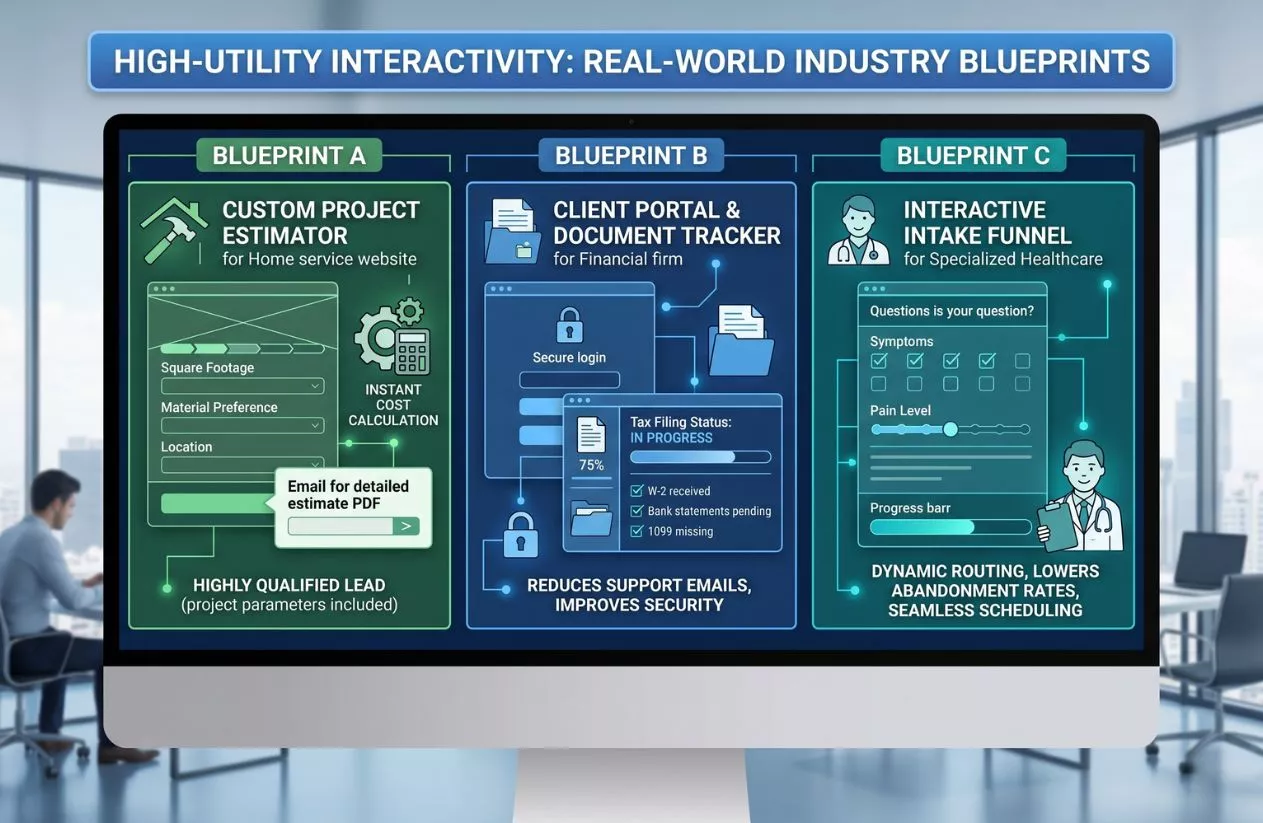
To understand the business value of interactivity, we must look past basic contact forms. Different industries require tailored tools that directly address customer pain points, build immediate trust, and capture highly qualified sales data.
Here is how custom interactive web elements function across three key sectors, demonstrating how raw utility drives commercial conversion.
Blueprint A: The Custom Project Estimator (For Contractors & Home Services)
In the construction, roofing, and commercial contracting sectors, the number one question prospects have is, “How much will my project cost?” Instead of forcing prospects to call for a basic estimate, high-performance websites deploy a step-by-step cost estimator.
- The User Experience: The visitor enters details like square footage, material preferences, and geographic location. The tool guides them through a clean, multi-step progress bar, providing a realistic pricing bracket.
- The Technical Backend: Instead of using heavy, unoptimized plugins, this tool is written in lightweight Javascript. Calculations run instantly on the client side, while the layout is housed inside a custom-coded container to prevent layout shifts.
- The Funnel Conversion: To unlock the detailed, itemized PDF breakdown of their estimate, the user enters their email and phone number. Your sales team receives a highly qualified lead complete with project parameters, completely skipping the cold-calling discovery step.
Blueprint B: The Client Portal & Real-Time Document Tracker (For CPA & Financial Firms)
For professional services like CPA, accounting, and legal firms, client friction during document collection is a major operational bottleneck. Email chains with unsecured PDFs are a security risk and create unnecessary back-and-forth communication.
- The User Experience: Clients log into a secure, streamlined portal. Instead of searching their inbox, they view a clean visual progress dashboard showing precisely which documents have been received, which are pending, and the status of their current filing or tax preparation.
- The Technical Backend: A custom portal leverages secure file-transfer protocols and server-side processing to organize uploads into secure, isolated cloud directories. This structure bypasses the standard database limits of a standard WordPress setup, keeping the site’s footprint lean and secure.
- The Funnel Conversion: This level of professional transparency drastically reduces customer support emails, saves hours of manual administration, and proves to high-net-worth clients that your technical infrastructure matches your premium physical service.
Blueprint C: The Interactive Intake Funnel (For Specialized Healthcare Practices)
In specialized medicine and healthcare, intake forms are often cold, confusing, and tedious. Long sheets of text discourage patients from finalizing their appointments.
- The User Experience: Patients interact with a responsive, step-by-step intake funnel. Each screen presents a single, straightforward question accompanied by clear, large visual selections.
- The Technical Backend: Logical routing ensures patients only see relevant fields based on previous answers, reducing form completion time. Data is processed through an encrypted transit layer to maintain strict security compliance without storing sensitive data locally on the web server.
- The Funnel Conversion: This dynamic approach lowers form abandonment rates, helps triage patient priority before they arrive, and seamlessly schedules appointments directly into the practice’s internal scheduling platform.
Related Article: Best WordPress Website Developers in Denver
Financial Reality: How Much Does It Cost to Build an Interactive Website?
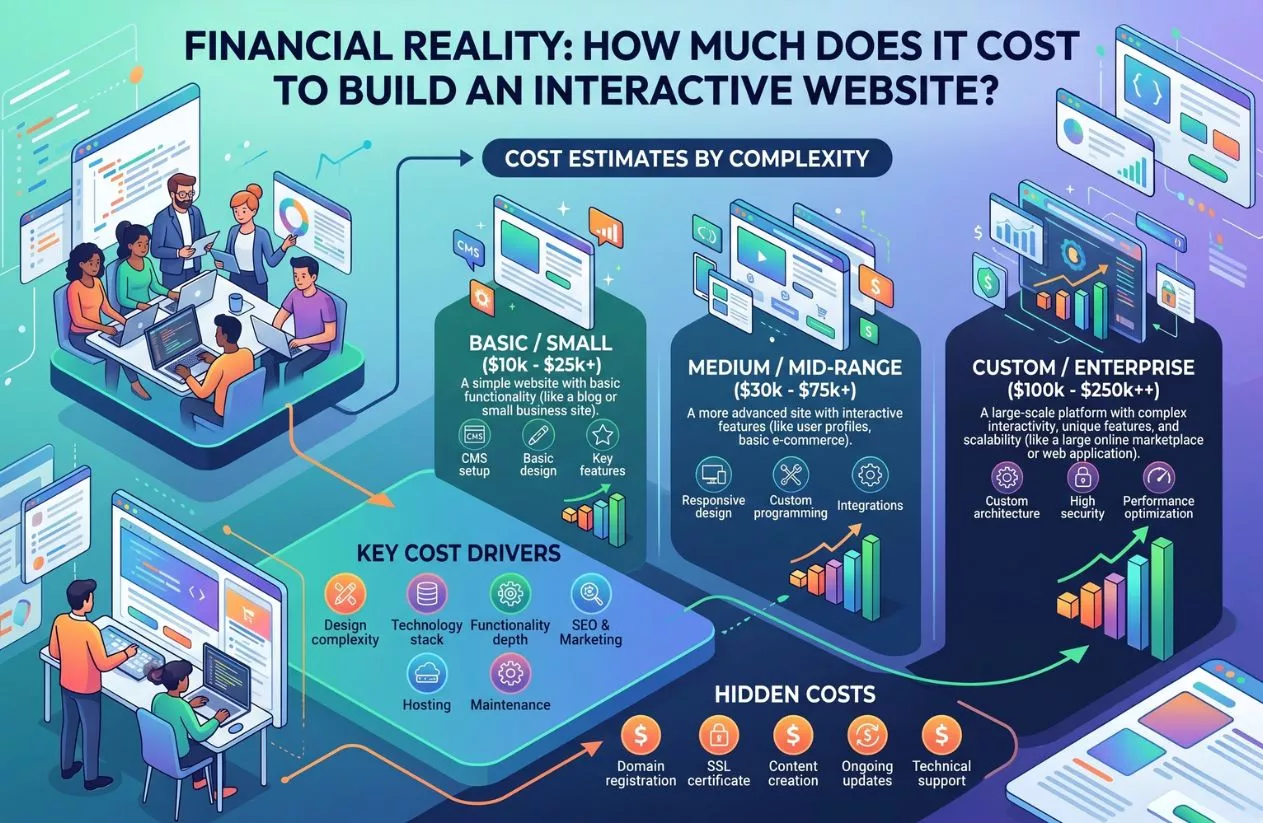
To understand the true cost of an interactive website, you must look beyond the initial development invoice and calculate the 3-Year Total Cost of Ownership (TCO). There are two primary hidden financial leaks that unoptimized, amateur setups pass on to businesses:
1. The “Plugin Tax”
Amateur builders achieve interactivity by stacking dozens of premium third-party plugins. This creates an ongoing, annual recurring cost for licenses (such as premium form builders, security suites, and visual tools) that can easily exceed $1,200 to $3,000 per year. Custom-engineered websites eliminate this tax by coding interactive functionality directly into the core theme.
2. Technical Debt and Maintenance Overhead
When third-party plugins auto-update, they frequently conflict with one another, causing interactive tools to break. The cost of hiring developers to repeatedly troubleshoot these breaks, combined with the lost conversions during site downtime, represents a massive ongoing operational expense.
The table below breaks down the 3-year TCO and structural reality across different web engineering models:
| Cost & Structural Metrics | Unoptimized Amateur Site (DIY / Cheap Freelance) | Custom Hybrid Engineering (The Interactive Builds Model) | Advanced Enterprise Portal (Complex Systems Integration) |
| Typical Initial Setup | $1,500 – $5,000 | $15,000 – $45,000 | $50,000 – $150,000+ |
| Annual “Plugin Tax” | $1,200 – $3,000 / year | $0 (Custom JavaScript engines) | $2,500 – $10,000+ / year |
| Annual Technical Maintenance | $2,000 – $5,000 (To fix broken updates) | $0 (Included in managed maintenance) | $12,000 – $36,000+ (Dedicated staff) |
| Core Web Vitals (INP) | Poor (Exceeds 500ms) | Outstanding (Under 200ms) | Outstanding (Under 200ms) |
| Estimated 3-Year TCO | $11,100 – $29,000 (Plus lost lead revenue) | $15,000 – $45,000 (Predictable, fixed asset) | $93,500 – $288,000+ |
| Primary Business Outcome | High customer friction, poor search visibility, and recurring security risks. | High conversion rates, strong organic search presence, and zero technical debt. | Complete operational automation and enterprise-grade data security. |
From Static Pages to Active Revenue Engines
Leaving your website as a plain, static brochure means missing out on steady sales and leads every single day. When you shift your focus to how to build an interactive website that actually connects with people, you turn your online space into a hard-working asset that gains trust and captures leads around the clock. It takes more than just a pretty design; it requires a fast, clean setup and tools that make sense for your visitors.
You don’t have to struggle with the technical coding or settle for clunky templates that slow your site to a crawl.
If you are ready to upgrade your business with fast calculators, easy portals, or custom tools built for your specific industry, book a Strategic Blueprint Consultation with Interactive Builds today so we can start planning a site that grows your business.
Related Article: How to Choose a Web Design Agency

